It’s renewal season, and if your firm’s cyber insurance policy is coming up, you have probably noticed the questionnaire is longer than it used to be. Insurers have tightened their cyber insurance requirements for small business Ontario firms, and accounting practices feel it more than most. You hold SINs, banking details, tax returns and payroll records for hundreds of clients, which makes your firm a valuable target and a careful underwriting decision.
That questionnaire matters more than it looks. A single “no” can raise your premium or lead to a refused quote. A “yes” that turns out to be wrong can be worse: after a breach, an insurer that finds a control was never in place may deny the claim. This guide walks through the six security controls insurers now ask about, how they word the questions, what proof they expect, and how GoCloudii helps accounting and bookkeeping firms across the GTA answer every question with confidence.
Why cyber insurance requirements for small business in Ontario changed
Cyber insurance used to be sold with a short form and a few checkboxes. Ransomware and email fraud changed that. Over the past few years, claims for encrypted servers, stolen data and fraudulent wire transfers grew quickly, and insurers responded by asking for more specific controls and, increasingly, for evidence that those controls actually exist.
The Canadian Centre for Cyber Security’s baseline controls for small and medium organizations cover much of the same ground insurers now look for: multi-factor authentication, backups, patching, endpoint protection and email security. The difference is that an insurer may ask you to show it, with screenshots, reports or a short call with your IT provider.
If you already worked through our 2026 IT security checklist for GTA offices, you have a good foundation. This post focuses on the next step: what insurers ask, and what proof they want.
The 6 controls Ontario insurers ask about
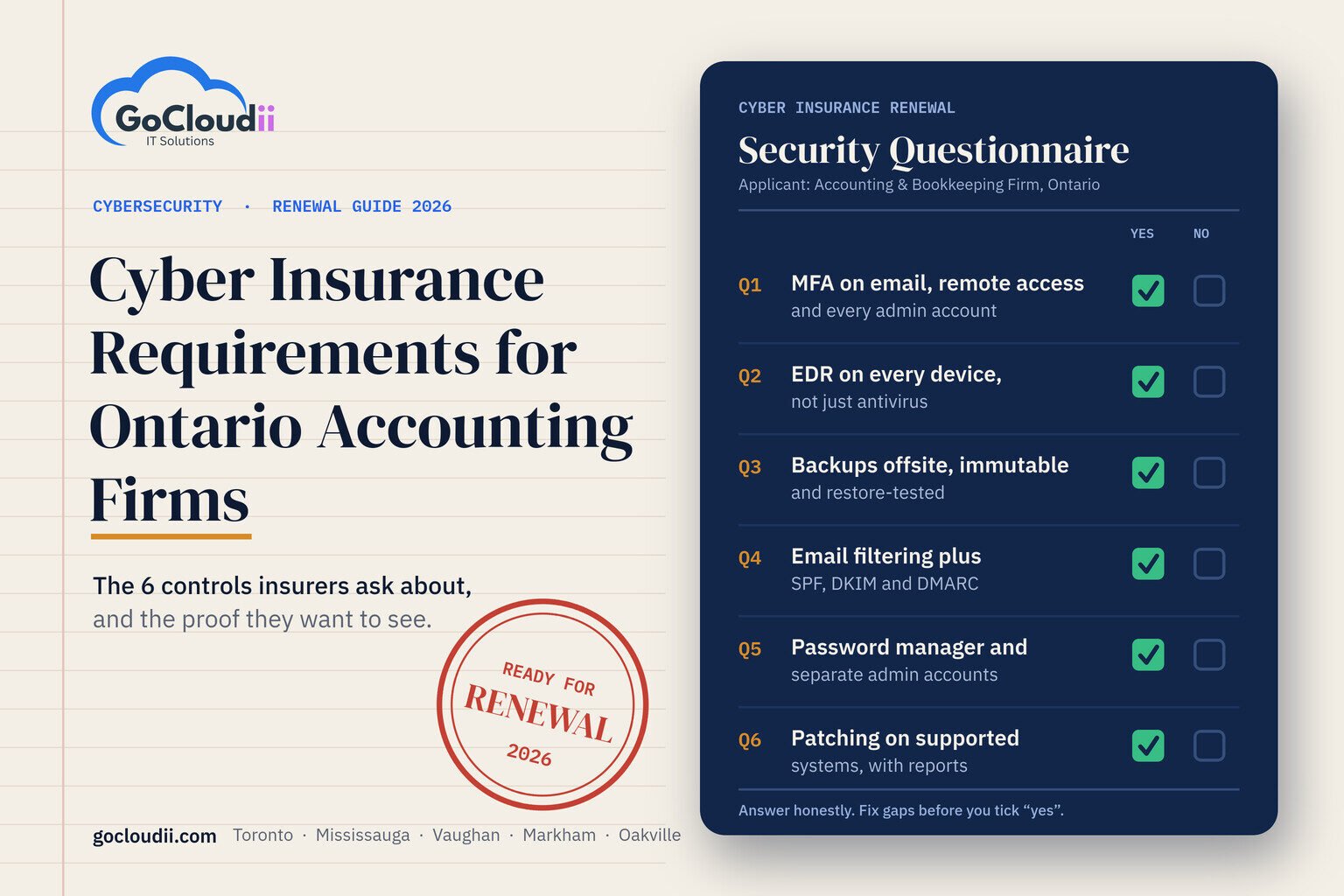
Every insurer words its application differently, but the same six themes appear on almost every renewal form we see. For each one, here is what it means, how the question is usually phrased, what counts as proof, and how we put it in place. Treat it as your cyber insurance checklist for Canada in 2026.
1. MFA requirement for cyber insurance: email, remote access and admin accounts
What it is: Multi-factor authentication (MFA) asks for a second check, such as an app prompt on your phone, after a password. It stops most account takeovers, even when a password has been stolen.
How insurers ask: “Is MFA enforced for all email access, all remote access and all privileged or administrator accounts?” Note the word “all”. One shared front-desk mailbox without MFA can turn the answer into a “no”.
What proof looks like: A report showing every user enrolled in MFA, and the policy that enforces it.
How GoCloudii delivers it: We use Microsoft 365 Conditional Access to require MFA for every user, block legacy sign-in methods that skip MFA, and apply stricter rules to admin accounts. Our Microsoft 365 solutions team exports the enrolment report you can hand to your broker.
2. EDR for cyber insurance, not just antivirus
What it is: Endpoint Detection and Response (EDR) watches for suspicious behaviour on each computer and server, such as a program trying to encrypt files, and can isolate the device automatically. Traditional antivirus only looks for known threats.
How insurers ask: “Do you use an EDR solution on all endpoints and servers? Please name the product.” Many forms now list “antivirus only” as a separate, lower-scoring answer.
What proof looks like: The product name, plus a console report showing every device is covered and reporting in.
How GoCloudii delivers it: We deploy and monitor a recognized EDR platform, such as CrowdStrike, SentinelOne, Bitdefender GravityZone or Microsoft Defender for Business, depending on your size and licensing. Alerts go to our team, not to an inbox nobody reads.
3. Backups that are offsite, immutable and tested
What it is: Backups stored away from your office network, protected so they cannot be changed or deleted (immutable), and restored on a schedule to prove they work. Ransomware often targets backups first.
How insurers ask: “Are backups stored offline or in an immutable format? How often are restores tested?” Some also ask whether Microsoft 365 data, including email, OneDrive and SharePoint, is backed up separately.
What proof looks like: Backup job reports, the retention and immutability settings, and a dated record of your last test restore.
How GoCloudii delivers it: We use Acronis for computers and servers and AvePoint for Microsoft 365, and we run documented test restores. Microsoft does not back up your 365 data the way most people assume; our post on why Microsoft 365 backup is important for business explains the gap.
4. Email security and domain protection
What it is: Filtering that catches phishing and malicious attachments before they reach staff, plus SPF, DKIM and DMARC records that stop criminals from sending email that appears to come from your domain.
How insurers ask: “Do you use advanced email filtering? Have you implemented SPF, DKIM and DMARC?” Some ask for your DMARC policy level.
What proof looks like: Your filtering product name and a DNS check showing all three records in place, ideally with DMARC set to quarantine or reject.
How GoCloudii delivers it: We configure filtering and set up all three records, then move DMARC to enforcement once legitimate senders are confirmed. Our guide to SPF, DKIM and DMARC for business owners explains each one in plain language. Consistent, centrally managed email signatures through Exclaimer also help clients recognize genuine messages from your firm.
5. Password management and privileged access
What it is: A business password manager so staff use long, unique passwords, and separate admin accounts so everyday logins can’t change system settings.
How insurers ask: “Do administrators use separate accounts for privileged tasks? Is a password manager in use?”
What proof looks like: A list of admin accounts showing they are separate from daily user accounts, and your password manager deployment.
How GoCloudii delivers it: We roll out 1Password Business, create dedicated admin accounts protected by MFA, and remove admin rights people don’t need. This lines up with Week 2 of Cyber Security Awareness Month, which focuses on strong passwords, password managers and MFA. The Get Cyber Safe guide for small businesses is a good primer to share with your team.
6. Patching and supported systems
What it is: Installing security updates promptly on every device, and retiring software and operating systems that no longer receive updates.
How insurers ask: “Are critical patches applied within a set number of days? Do you run any end-of-life operating systems or software?”
What proof looks like: A patch compliance report and a device inventory showing operating system versions.
How GoCloudii delivers it: Through our managed IT services for accountants across Ontario, NinjaRMM patches devices automatically and produces the reports insurers want. If you still have older computers, read our guide to Windows 10 end of support and ESU year two.
Cyber insurance requirements for accounting firms: what’s different
Accounting practices have a few risks that general checklists miss. Insurers know this, and so should your controls.
- Tax season staffing. Seasonal and remote staff often join in a hurry. They need MFA, a managed device and the right access from day one, and their access should end the day their contract does.
- Client portals. Portals for sharing returns and statements should require MFA for staff and clients, and should never be replaced by email attachments when deadlines get tight.
- Phishing that pretends to be CRA or a client. Fake CRA notices, “updated banking details” from a client and urgent requests for a T4 or a notice of assessment are common lures. Filtering helps, and so does short, regular staff training.
- Wire and e-transfer fraud. Confirm any change to payment instructions by phone, using a number you already have on file. Many insurers ask about this call-back procedure directly.
If you’re looking for cybersecurity for accounting firms in Toronto, Mississauga, Vaughan, Markham or Oakville, our cybersecurity services are built around these realities, not a generic template.
How to answer the cyber insurance questionnaire honestly
The most important rule is simple: never tick “yes” to a control you don’t have. Your application forms part of your policy. If a statement turns out to be inaccurate, the insurer may have grounds to reduce or deny a claim, or to cancel coverage.
A better approach looks like this:
- Read each question with your IT provider and decide together whether the honest answer is “yes”, “partly” or “no”.
- Close the gap before you submit, where you can. Most of the six controls can be put in place in a few weeks.
- Where a control is still in progress, say so and give a completion date. Brokers can often present a clear plan more favourably than a vague answer.
- Keep your evidence in one folder, so you can answer follow-up questions quickly.
If you’d like cyber insurance questionnaire help, we can sit down with your application and go through it line by line. We don’t promise that any insurer will approve your coverage; that decision is theirs. What we can do is make sure every answer you give is true and backed by proof.
Your renewal timeline: 60, 30 and 7 days out
60 days before renewal
- Ask your broker for this year’s application and read it in full.
- Book a readiness review and compare each question against what you actually have.
- Start any larger work first, such as EDR rollout or immutable backups.
30 days before renewal
- Confirm MFA is enforced for every user, including shared and seasonal accounts.
- Run and document a test restore.
- Check SPF, DKIM and DMARC, and export your patch and device reports.
7 days before renewal
- Review the completed questionnaire with your IT provider before you sign.
- Save all evidence in one place for your broker.
- Note any open items with a firm completion date.
Frequently asked questions
Does cyber insurance require MFA in Canada?
There is no single legal rule, but MFA is now one of the most common requirements on Canadian cyber insurance applications. Most insurers expect MFA on email, remote access and admin accounts, and some will not quote without it.
Is Microsoft Defender enough for cyber insurance?
The free antivirus built into Windows is usually not enough on its own. Microsoft Defender for Business includes EDR features and is accepted by many insurers when it is properly configured and monitored on every device. Always check the exact wording on your application.
What happens if my backups aren’t tested?
You may not find out they are broken until you need them. Many questionnaires ask how often restores are tested, and an honest “never” can affect your premium or terms. A documented test restore is quick to arrange and gives you proof.
How long does it take to become insurance-ready?
It depends on where you start. A small accounting firm that already uses Microsoft 365 can often close the main gaps in two to six weeks. Starting 60 days before renewal gives you time to do it properly.
Related reading: Law Firm Cybersecurity in Ontario: How to Stop Business Email Compromise and Wire Fraud · Microsoft Defender vs Bitdefender: Which Endpoint Protection Fits Your GTA Office?
Cyber insurance renewal coming up?
Book your free Cyber Insurance Readiness Review
Know where you stand before your renewal. We’ll go through your insurer’s questionnaire with you, check each of the six controls, and give you a clear plan and the evidence to back every answer. GoCloudii supports accounting and bookkeeping firms in Toronto, Mississauga, Vaughan, Markham, Oakville and across Ontario.