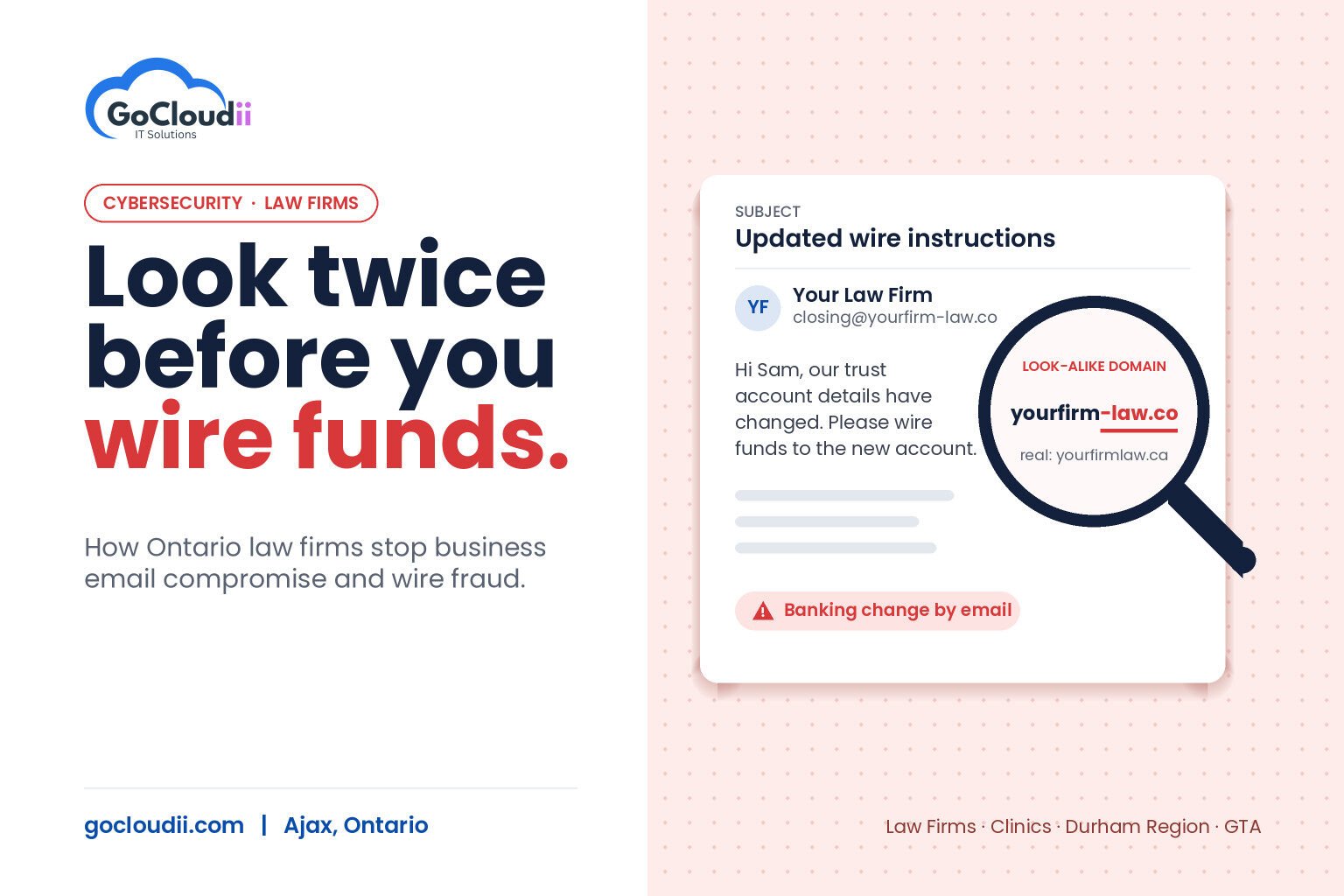
A client receives an email that looks exactly like it came from your firm. It has the right lawyer’s name, the right file number and the right closing date. It says the trust account details have changed and asks the client to wire the funds to a new account. By the time anyone notices, the money is gone. This is business email compromise (BEC), and it is one of the biggest cybersecurity risks facing law firms in Ontario. Real estate closings, estate payouts and settlement funds all involve large transfers and time pressure, which is exactly what fraudsters look for. This guide explains how BEC attacks work, why law firm cybersecurity in Ontario needs to focus on email, and the practical controls that stop wire fraud before it happens.
What is business email compromise?
Business email compromise is a scam where an attacker uses email to trick someone into sending money or sensitive information. Unlike ransomware, there is often no malware involved. The attacker relies on trust, urgency and a convincing message.
BEC attacks against law firms usually take one of three forms:
- Look-alike domains. The attacker registers a domain that is one letter off from your firm’s, such as swapping “rn” for “m” or adding a hyphen, and emails clients or other lawyers from it.
- Compromised mailboxes. The attacker steals a real staff member’s password, often through a fake Microsoft 365 sign-in page, then reads ongoing conversations and sends fraudulent instructions from the genuine account.
- Reply-chain hijacking. The attacker inserts themselves into an existing email thread about a transaction, so the fake request appears in context and looks routine.
In each case, the message arrives at the moment money is about to move.
Why law firm cybersecurity in Ontario starts with email
Law firms combine several things attackers want:
- Trust account funds that move in large amounts on known dates
- Clients who expect instructions by email and may not know your firm’s process
- Confidential information, such as identification documents and financial details, that can be reused in other fraud
- Small teams where one clerk or assistant may handle both email and payments
Ontario lawyers also have a professional duty under the Law Society of Ontario’s Rules of Professional Conduct to keep client information confidential, so a compromised mailbox is both a financial and a professional risk. Many firms also carry cyber insurance, and insurers increasingly ask about email security controls at renewal.
Warning signs of a business email compromise attempt
Train everyone in the firm, and your clients, to stop and verify when they see:
- A request to change banking or wire instructions, especially close to a deadline
- A sender address that is slightly different from the usual one
- Urgent language like “must be sent today” or “do not call, I’m in a meeting”
- A reply that comes from a different address than the one you originally emailed
- Unexpected attachments or links asking you to sign in to view a document
How to stop wire fraud at your firm
1. Never change payment instructions by email alone
The single most effective control is a process, not a product. Tell clients at the start of every file that your firm will never change banking details by email. Any change to payment instructions must be confirmed by phone using a number already on file, not one provided in the email. Apply the same rule internally before your firm sends funds.
2. Turn on multi-factor authentication everywhere
Most mailbox takeovers start with a stolen password. Multi-factor authentication (MFA) on every Microsoft 365 account, including shared and administrator accounts, blocks most of these attempts. The Microsoft Authenticator app is stronger than text-message codes, and phishing-resistant options such as passkeys or security keys are stronger still.
3. Use advanced email protection
Basic spam filtering is not enough. Microsoft Defender for Office 365, included in Microsoft 365 Business Premium, adds:
- Anti-phishing and impersonation protection that flags messages pretending to be your lawyers or your domain
- Safe Links, which checks links when they are clicked, not just when the email arrives
- Safe Attachments, which opens attachments in a sandbox to look for malicious behaviour
Firms using Bitdefender GravityZone for endpoint protection can add its email security module for an additional filtering layer. The right choice depends on your licences and existing tools.
4. Protect your domain with SPF, DKIM and DMARC
These email authentication records make it harder for attackers to send email that appears to come from your exact domain. A DMARC policy set to quarantine or reject tells receiving servers what to do with messages that fail the checks. It won’t stop look-alike domains, but it closes the easiest route.
5. Watch for suspicious mailbox activity
Attackers who get into a mailbox often create hidden inbox rules that forward or delete messages, so the real user never sees replies. Alerts for new forwarding rules, sign-ins from unusual locations and impossible travel help catch a compromise early. Conditional Access policies in Microsoft Entra ID can block sign-ins from countries where your firm doesn’t work.
6. Train staff with realistic examples
Short, regular security awareness sessions using real BEC examples are more effective than a single annual presentation. Make sure clerks and assistants who process payments know they are expected to slow down and verify, even if a lawyer appears to be asking them to rush.
What to do if you suspect a BEC attack
If you think funds have been sent to a fraudster, act quickly:
- Call your bank immediately and ask it to attempt a recall of the transfer.
- Reset the affected user’s password, sign them out of all sessions and check for forwarding rules.
- Contact your IT provider to investigate how the attacker got in.
- Notify your insurer and follow your firm’s incident response plan.
- Report the fraud to your local police and the Canadian Anti-Fraud Centre.
Speed matters, because recovering a wire transfer becomes much harder once the funds have moved on.
Frequently asked questions
Does Microsoft 365 Business Premium include protection against business email compromise?
Business Premium includes Microsoft Defender for Office 365 Plan 1, which provides anti-phishing, Safe Links and Safe Attachments. It still needs to be configured correctly, and it works best combined with MFA and a payment verification process.
Can DMARC stop look-alike domain attacks?
No. DMARC protects your exact domain from being spoofed. Look-alike domains need impersonation protection, user awareness and phone verification of payment changes.
How often should a law firm run security awareness training?
Short sessions every few months, plus simulated phishing tests, keep the warning signs fresh. New staff should be trained before they handle client funds.
Related reading: SPF, DKIM & DMARC Explained For Business Owners · Cyber Insurance Requirements for Ontario Accounting Firms: The 2026 Renewal Checklist
Protect your firm and your clients
GoCloudii is a managed IT provider based in Ajax, helping law firms, clinics and other professional offices across Durham Region and the GTA protect email, devices and client data. Our cybersecurity services cover email protection, MFA and monitoring, our Microsoft 365 solutions make sure Defender and Conditional Access are set up properly, and our managed IT services keep everything maintained. Contact us to review your firm’s email security.